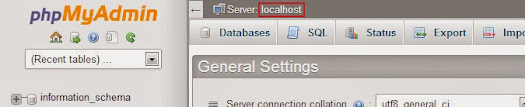
Some web software for a website needs the value of the hostname of a database server for it to be installed to a web server, such as WordPress (software) which needs MySQL database connection details. The MySQL database hostname will usually be "localhost" on most web hosting companies, but not always!
The name could be simply "localhost" if your database is local to your web server or to the server on your hosting provider. But if your database is external to your web server or to your hosting server, then you or your hosting provider would need to put the name of that database.
Most Hosting Providers
To be sure about your database hostname, here we will going to find the exact hostname of MySQL server through the application called phpMyAdmin, version 4.0.5:
- First, log in to your control panel.
- Find the PHP application "phpMyAdmin":

- On the Databases heading section if you're using cPanel.
- Or on the Advanced Features heading section if you're using DirectAdmin Web Control Panel.
- And in phpMyAdmin, the value of the item "Server" on the top of the user interface, is your database hostname.